Automation
Is Your AI-Built Website Actually Invisible to Google?
We tested live customer sites GoDaddy names as built with its Airo AI tool. Three of four block search engines outright. Here's what that means for your business.
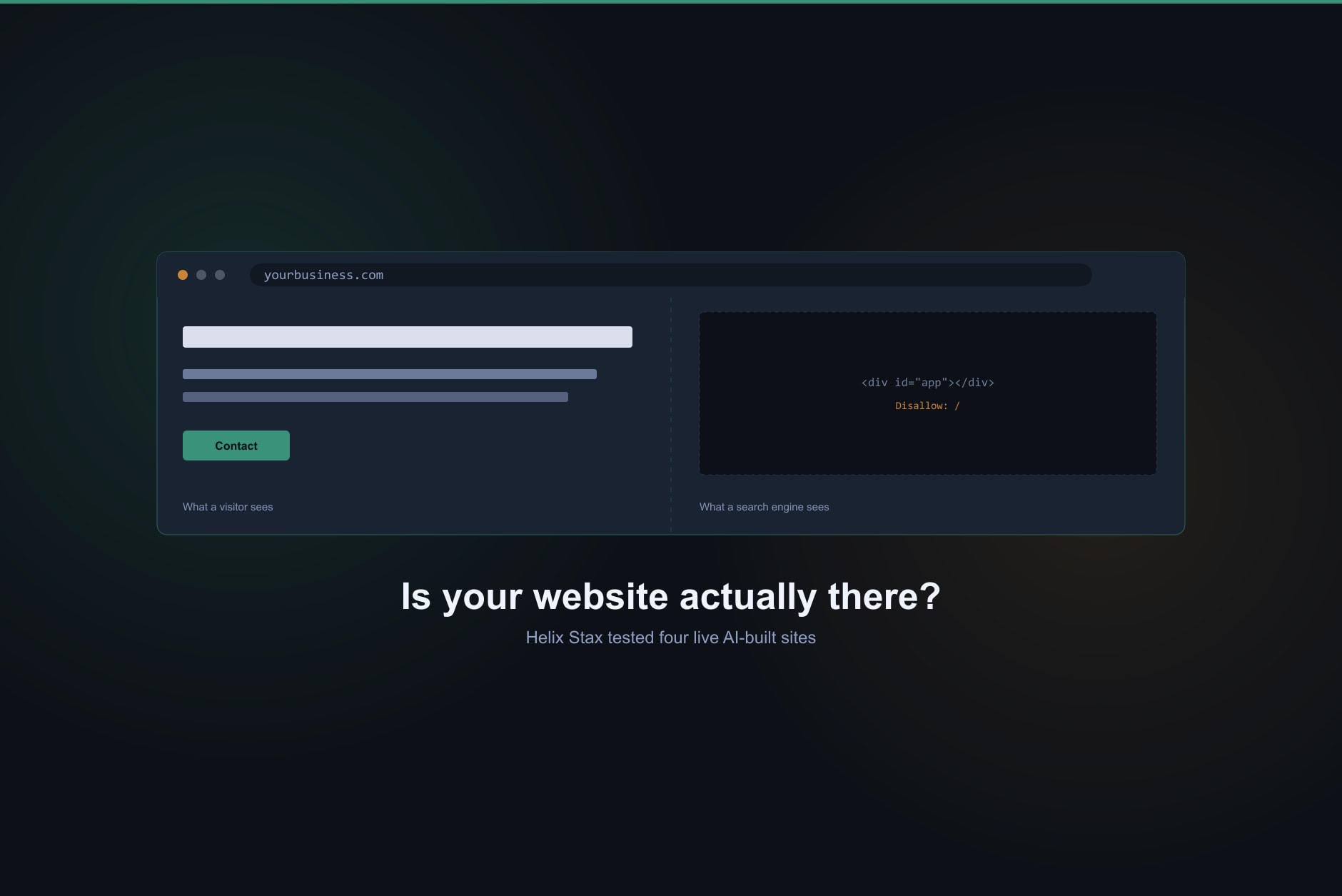
No. A website search engines cannot see is not a finished website, no matter how quickly it went from a text prompt to a published URL. We tested four live customer sites that GoDaddy’s own marketing names as built with its Airo AI tool. Three of the four ship a file telling every search engine to skip them entirely.
Here’s the file, word for word, pulled directly from three separate live sites on the same day:
User-agent: *Disallow: /
That single line means Google, Bing, and every other crawler are instructed to leave. Not to rank the site lower. To not look at it at all.
What does “the AI built my website” actually mean?
It means a tool generated a page fast. It says nothing about whether that page is reachable by the people who are supposed to find it. Those are two different jobs, and a business owner evaluating a new website tends to check only the first one: does it look good, does it load, is the phone number right. Helix Stax evaluates a website the way it evaluates any other piece of business infrastructure, not as a design vendor grading colors and fonts, but as a system that either does its job or doesn’t.
A website’s job is showing up when a potential customer searches for what you do. A site can pass every visual check and fail that one completely.
What did testing an actual AI-built website show?
We pulled the raw HTML, the same code a search engine sees before any script runs, from four live customer sites GoDaddy names on its own site as built with Airo. Three of the four came back nearly empty: 576 bytes, 647 bytes, 644 bytes of raw code. For comparison, this paragraph alone is longer than that. No headline tag. No description. No structured data. Just an empty placeholder <div> and two script tags, waiting for a browser to fill in the rest.
One of the three still had its default template title showing live: “App Template.” Nobody had changed it. Another site’s title was blank, an empty comment where a title should have been, on a business’s actual home page. These aren’t hypothetical risks. They’re what shipped, live, on the date we checked.
A page that only exists after JavaScript runs is a page a search engine may never actually read. That is the whole mechanism behind everything below.
The fourth site was different. It shipped a real, readable head section in its raw code, complete with a description and structured data a search engine could use immediately, no script execution required. Same builder. Same AI. The gap between that one site and the other three wasn’t the AI. It was one setting.
Why does blocking search engines matter more than how a site looks?
Because a site nobody can find doesn’t do the one thing a small business website exists to do. SCORE, the SBA’s network of business mentors, lists being found by new customers as one of the central reasons a small business needs a website at all. A page that’s invisible to search doesn’t accomplish that reason, regardless of how polished the design looks to the one person who already has the link.
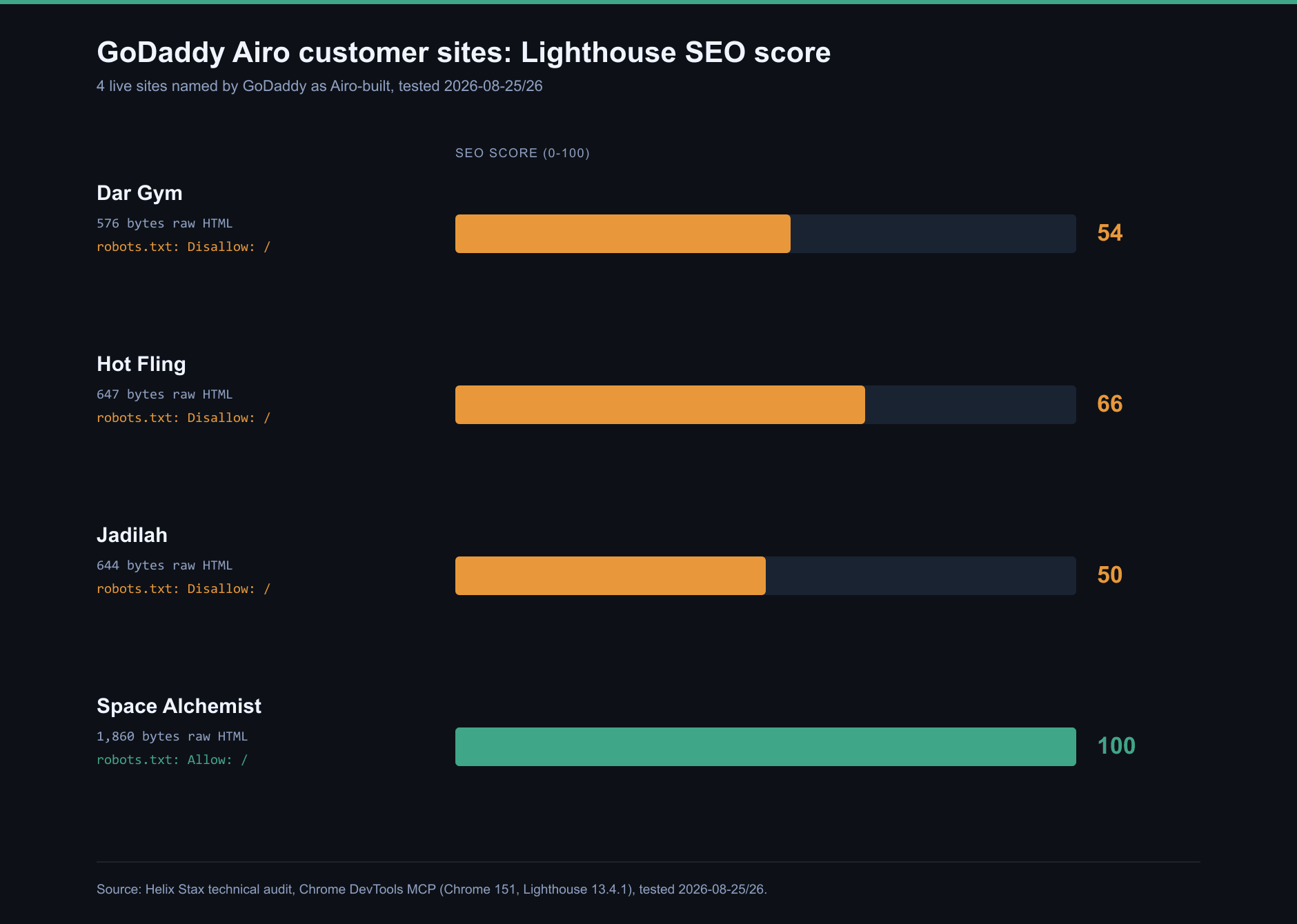
We ran Lighthouse’s SEO check against all four sites. The three blocked by robots.txt scored between 50 and 66 out of 100. The one that wasn’t blocked scored 100. That’s not a subjective design opinion. It’s the same automated tool, the same day, the same builder, producing a 40-plus-point gap explained entirely by one file.
| Site | Raw HTML size | robots.txt | Lighthouse SEO score |
|---|---|---|---|
| Dar Gym | 576 bytes | Disallow: / | 54 |
| Hot Fling | 647 bytes | Disallow: / | 66 |
| Jadilah | 644 bytes | Disallow: / | 50 |
| Space Alchemist | 1,860 bytes | Allow: / | 100 |
Are all AI website builders like this?
We didn’t test every platform, and we’re not going to pretend we did. What we tested is one mechanism on one platform, using that platform’s own published customer examples, on one specific date. The mechanism itself is worth understanding regardless of which tool built the page: a site rendered almost entirely through client-side scripts, with nothing meaningful in the raw HTML, is only as visible as its crawl settings allow. Combine an empty raw page with a blanket “don’t crawl this” instruction, and you have a site that exists for humans with a direct link and nobody else.
That’s reasoning about how crawlers and rendering work, not a claim about every AI website tool on the market. Anyone can check their own site the same way we checked these: view the page source, and check the robots.txt file. It takes about thirty seconds and neither step requires a developer.
What should a business owner actually check before trusting a new website?
Three things, in order. First, view the page’s source code (right-click, “View Page Source”) and see whether your business name, description, and services actually appear in the raw text, or whether it’s mostly empty tags waiting on a script. Second, load yoursite.com/robots.txt directly in a browser and read what it says. Third, search for your own business name and a few of your services in an incognito browser window and see whether your own site shows up at all.
None of this requires trusting a vendor’s word for it. All three checks are things you can do yourself, on any website, in a few minutes, whether it was built by a person, a template, or an AI tool.
What does this have to do with Helix Stax instead of a web design shop?
Everything, and it’s why we ran this test in the first place. A design vendor is evaluated on how the site looks in the demo. Helix Stax doesn’t sell websites or the tools that build them, so there’s no incentive to gloss over a crawl-blocking file just because the homepage renders nicely in a browser preview. The test above cost us nothing to run and cost the businesses in that GoDaddy example a level of visibility they likely don’t know they’re missing.
That’s the same lens Helix Stax uses in a Systems Audit: does the technology actually function as infrastructure for the business, not just as a demo. CTGA, which stands for Controls, Technology, Growth, and Adoption, is the framework behind that evaluation. It’s a maturity framework for how ready a business is to use its technology well, not a security rating, and a website sits squarely inside two of those four categories: it’s a piece of Technology, and it’s meant to drive Growth. A site that’s invisible to search fails at both at once, no matter how it was made.
What should you actually do next?
Check your own robots.txt file today. It takes thirty seconds and it’s the single fastest way to know whether your business exists to search engines at all. If you want a broader read on whether your website, and the rest of your technology, is actually built to support the business rather than just present it, the CTGA Framework explains how that assessment works and what it measures.
Test conditions: Tested August 25 and 26, 2026, using Chrome DevTools (Chrome 151, Lighthouse 13.4.1) and curl, against live, already-published customer sites identified via GoDaddy’s own customer showcase page naming them as built with Airo, and confirmed as Airo via a technical fingerprint in each site’s server response. These are published sites that may have been edited after initial creation. Findings describe each page as served on the test date, not necessarily the platform’s unedited output.
Read more
Automation
AI Acceptable Use Policy: A Free Template Small Businesses Can Actually Use
A ready-to-use AI acceptable use policy template for small businesses, plus what belongs in it, the data-leakage risks that make one necessary, and how it lines up with the NIST AI Risk Management Framework.

Automation
AI Automation for Small Business in Hampton Roads: Where to Actually Start
AI automation for small business works best on narrow, repeatable tasks. See where business process automation pays off for Hampton Roads companies, where it does not, and how to start without a developer.
Cybersecurity
Network Security Assessment Checklist: What to Inspect and Which Tools Actually Help
A network security assessment checklist covering perimeter, segmentation, wireless, identity, endpoints, logging, and patching, plus what the assessment tooling landscape looks like and how to read your results.
Frequently asked questions about Helix Stax managed IT services
It depends entirely on how the site is built and configured, not on whether AI was involved. We tested four live customer sites that GoDaddy names as built with its Airo tool. Three shipped a robots.txt file that told every search engine not to crawl the site at all. The fourth had no such block and scored a clean 100 on Lighthouse's SEO check. Same builder, same AI, two different outcomes, because one setting was different.
robots.txt is a small text file that tells search engine crawlers which parts of a site they're allowed to read. A line reading 'Disallow: /' tells every crawler to skip the entire site. Sometimes that's intentional, for a staging site that isn't ready for the public. On a live customer-facing site, it usually means nobody checked the file before launch.
Type your website's address followed by /robots.txt into a browser. If you see a line that says 'Disallow: /' with nothing else limiting it, search engines are being told to skip your entire site. You can also right-click any page and choose 'View Page Source' to see whether your headline, description, and content actually appear in the raw code, or whether the page is an empty shell that only fills in after the browser runs a script.
No, and that would overstate what we tested. We confirmed this specific crawl-blocking pattern on one platform, using its own named customer examples. The broader mechanism, a page built almost entirely in client-side code with no fallback content in the raw HTML, is a real risk with any site built this way, AI-generated or not. Whether a specific site has that problem depends on how it was built and configured, and the only way to know is to check it.
CTGA stands for Controls, Technology, Growth, and Adoption. It's a business-adoption maturity framework Helix Stax uses to evaluate whether a company's technology choices actually support the business, rather than just looking finished. A website is a Technology and Growth decision at once: does it work as infrastructure, and does it actually bring in customers. CTGA is a maturity framework, not a cybersecurity rating.